

Editors' Update - supporting editors, every step of the way.

Unfortunately we don't fully support your browser. If you have the option to, please upgrade to a newer version or use Mozilla Firefox, Microsoft Edge, Google Chrome, or Safari 14 or newer. If you are unable to, and need support, please send us your feedback.
August 25, 2026
|
5 min read
By José Stoop

Finding the right reviewers is one of the most important — and often most time-consuming — parts of an editor’s role. Even after identifying suitable experts, the process can quickly stall. A reviewer declines…. Another never responds…. Before long, the manuscript is back in your queue waiting for the next invitation!
While there’s no magic solution to reviewer availability, there are ways to make the process more efficient for you – and smoother for the author(s) – without increasing reviewer fatigue. A combination of good reviewer selection practices and leveraging existing Editorial Manager (EM) features like the Find Reviewers tool, as well as using alternate reviewers, can help keep manuscripts moving while reducing the amount of manual follow-up required.
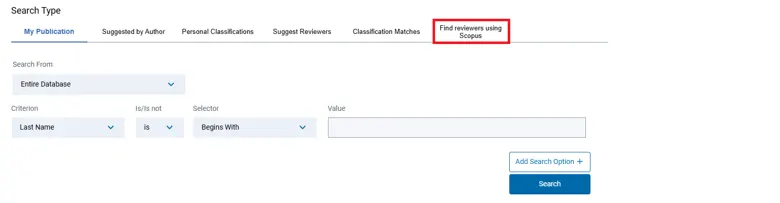
Accessing Find Reviewers in Editorial Manager. Selecting "Find reviewers using Scopus" from the reviewer search options opens the tool.
It all starts with choosing the right reviewers. The Find Reviewers tool allows you to match reviewer expertise closely to the topic of the manuscript, which remains the best predictor of a high-quality review. Refining search terms, interpreting past and current reviewer activity and publication insights, and looking beyond your usual pool of reviewers can all improve the quality of recommendations and your success rate in securing reviewers.
Editorial Advisory Board Members can be valuable reviewers and are more likely to accept a request to review. Maintaining a diverse reviewer pool further strengthens the peer review process by bringing together different perspectives and expertise. For revised submissions, don’t forget that original reviewers are often the best judges of how (or not!) authors have addressed previous comments.
Once you’ve identified suitable candidates, however, another challenge begins: keeping the invitation process moving.
One Editorial Manager feature that can make a real difference is Alternate Reviewers. Rather than waiting for an invited reviewer to decline before starting the search again, you can nominate alternate reviewers in advance. These reviewers are only invited automatically if an initial invitation is declined or expires, ensuring that the next step happens without additional editor intervention.
Although this feature is currently underused, our data clearly show it can have a meaningful impact. During a recent experiment that we conducted, our in-house scientific editors were encouraged to make greater use of Alternate Reviewers. The result was a smoother reviewer invitation process, with manuscripts spending less time pending editor action during peer review. Editors also reported an improved experience when it came to securing sufficient reviewers.
The Alternate Reviewers feature becomes even more effective when combined with automatic uninviting of non-responders. Instead of waiting indefinitely for a response, Editorial Manager can automatically withdraw reviewer invitations after a predefined period — typically seven days. If alternate reviewers have already been selected, the next invitation is triggered automatically, maintaining momentum without increasing the total number of reviewer invitations.
To set alternative reviewers, simply search for and select your reviewer candidates as you usually do. On the “Reviewer Selection Summary” page in Editorial Manager, you will see an overview of all your candidates. On this page you can also set a subset of your candidates as alternates by selecting the “Alt.” option for them. Once you have selected your alternate reviewers, you can even link them to specific regular candidates in case these decline to review by simply clicking on the link symbol next to the alternate reviewer’s name, and then select the regular reviewer candidate to whom you wish to link. Don’t see this option in Editorial Manager? It might be that your journal has not been enabled, or your role does not carry the permission to set alternate reviewers. Reach out to your Journal Manager for support!
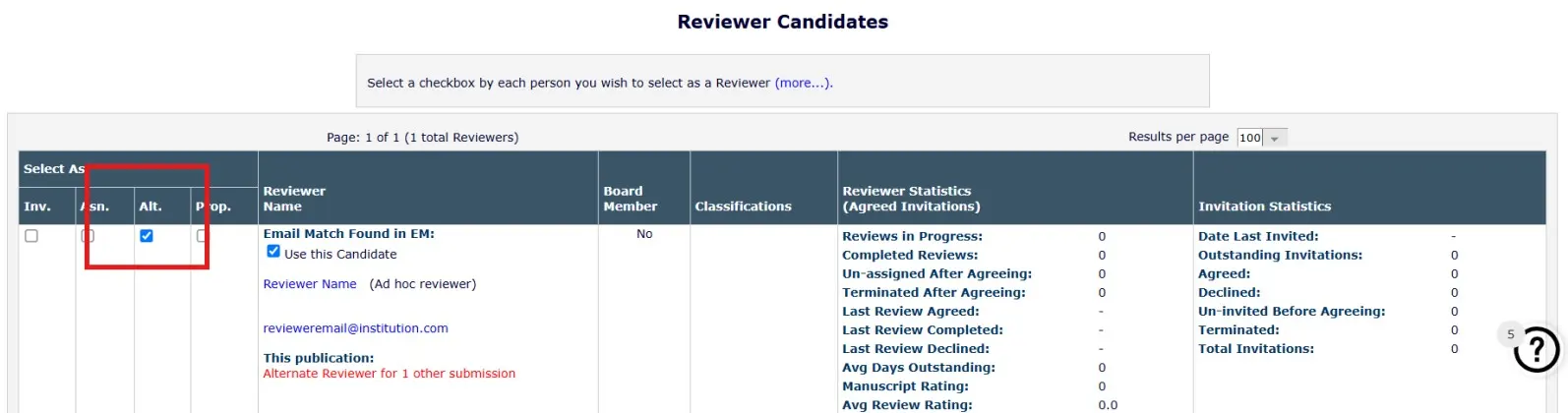
Review candidates in Editorial Manager, with the option to set certain candidates as Alternate Reviewers.
Together, these two features help strike an important balance. They reduce unnecessary delays while supporting responsible reviewer invitation practices, since alternate reviewers are only contacted when they are actually needed. Rather than sending large numbers of invitations at once, editors can build a workflow that responds automatically to reviewer decisions and keeps manuscripts progressing through peer review.
Editorial Manager also offers additional flexibility when identifying reviewers. The maximum number of reviewers that can initially be selected via the Find Reviewers tool has recently increased from 12 to 20. From these, we suggest inviting no more than six reviewers and leaving the others as alternates, giving editors more scope to identify suitable candidates while continuing to support thoughtful invitation practices.
Small workflow improvements often deliver the biggest gains over time. By combining careful reviewer selection with features such as Alternate Reviewers and automatic uninviting of non-responders, you can spend less time managing invitations and more time making editorial decisions — while providing authors with a faster, smoother peer review experience.
For more guidance on using Alternate Reviewers and additional tips for finding and selecting reviewers, check out the FAQ How can I use Alternate Reviewers in Editorial Manager?opens in new tab/window on our Support Hub, or reach out to your Journal Manager.