
Compare Tables: Evaluate multiple articles with ease
This new LeapSpace capability offers customizable comparison grounded in peer-reviewed literature and full-text depth.
Rapidly orient across references
When conducting a literature review, finding relevant research articles is just the first step. Once you have identified potential papers, you need to compare them, and that means building tables to understand how they differ.
Until recently, this was a manual, time-consuming process, typically disconnected from where you discover and evaluate papers. While several AI tools now offer support with this task, full-text coverage is often dependent on your institutional subscriptions or the files you upload, and requires additional workflow steps.
To help address these issues, the LeapSpace development team has built Compare Tables, a new capability within the LeapSpace standard summary response. Compare Tables generates a table that helps you rapidly orient across the references listed in that response; identifying methodological differences, comparing reported results, and indicating where deeper reading might be needed. Importantly, it draws directly from the LeapSpace knowledge base, which is home to millions of publisher-neutral, peer-reviewed, full-text documents – both subscription and open access. This reduces the need for external add-ons or workarounds.
Baked in flexibility
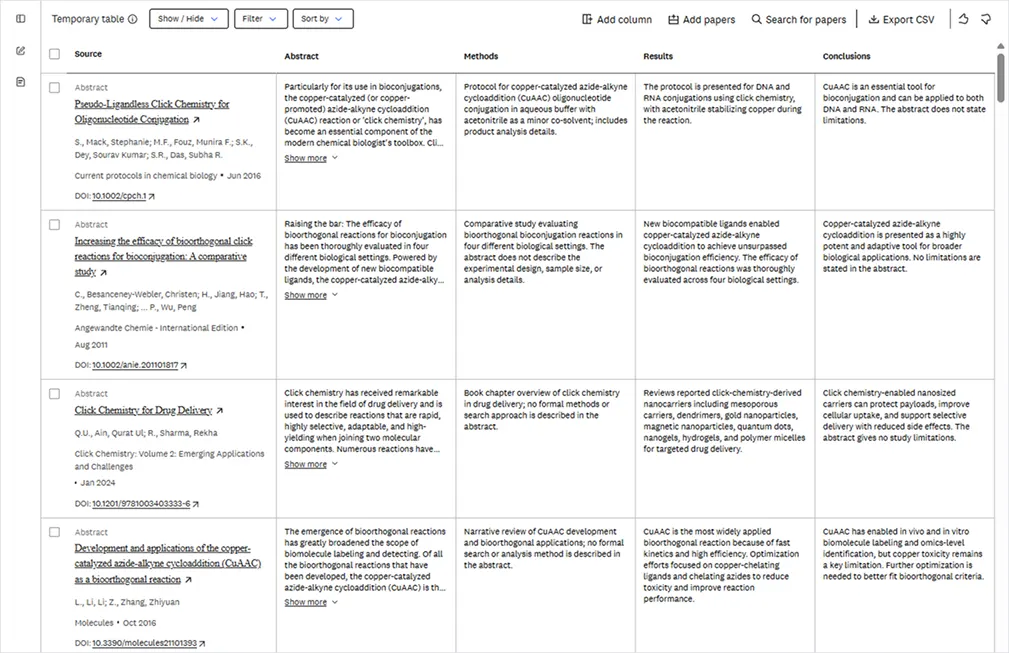
Identify methodological differences, compare reported results, and learn where deeper reading might be needed.
Ensuring Compare Tables can be tailored to meet individual researchers’ needs was a priority for the development team. That’s why you can customize the content and layout of each table using natural language prompts – a great option for more in-depth, granular exploration.
Compare Tables’ default columns are article or book chapter title, along with associated metadata (journal/book name, authors, publication date) abstract, methods, results and conclusions. If you want to take a deeper dive, there’s the option to add custom columns (the maximum table size is 15 columns). All you have to do is to let the system know what you want to explore. Compare Tables also looks at the context of the table and the papers within it to suggest columns.
In addition, you can delete columns, as well as rows (each of which relates to an individual paper). And you can use a natural language or DOI search to expand the content considered. The maximum number of articles per table is 70.
You can also filter the table contents by date range and limit the results to open access content and/or full text only. LeapSpace Product Manager Andy Albrecht says: “We wanted to ensure that researchers can filter out abstracts, because we know that often times, a lot of the value of these tables lies in the granular specifics only available in the full text.”
A drop-down menu lets you sort table contents by source title, recency of publication and citation count.
Support across your organization
Compare Tables is designed to serve multiple users’ needs:
Persona | Lead use case | Value |
|---|---|---|
PhD student / early-career researcher | First-pass literature orientation from an answer | Go from a list of papers to a structured view of what they studied, how, and what they found |
Postdoc / PI | Method and finding comparison across a focused paper set | Quickly identify which studies are methodologically comparable and where findings diverge |
Industry R&D scientist | Evidence triage for applied research decisions | Compare full-text-backed methods/results where available before committing to deeper review |
Interdisciplinary researcher | Normalize unfamiliar literature across domains | Use a consistent table structure to compare papers across different terminology and methods |
Research librarian / institutional evaluator | Evaluate AI-assisted literature workflows for trust and transparency | Support productive AI use while preserving source visibility and researcher control |
Building for the future
While Andy and his colleauges are excited to release Compare Tables, they are already thinking about the next steps. Here are just some of the ideas on the table:
The addition of a chat functionality: This would enable you to chat with the table — not just the information within the cells, but the underlying full text where it's indexed in LeapSpace's knowledge base.
Integration with more LeapSpace features: At the moment, Compare Tables is available for users of the summary response, but there are options to embed it wherever there is an aggregation of papers in LeapSpace; for example, Deep Research and Writing Coach.
The inclusion of Compare Tables in Conversational History: Currently, tables are treated as temporary files, so to retain the tables you’ve created, you must export and save them. This would add them to your Conversational History so they remain accessible longer.
The addition of uploaded documents in the tables: This would enable you to include files you’ve uploaded to LeapSpace using the File Upload option.
Andy adds: “Throughout the build process, our focus has been on reducing the time and cognitive load required to orient across a set of papers, while preserving the researcher’s ability to inspect, question and validate the underlying evidence. By embedding Compare Tables directly into LeapSpace, we think we’ve achieved that goal. It helps researchers move from discovery to structured comparison without switching tools, rebuilding context, or manually constructing a table from scratch. It’s the kind of in situ workflow that we hear our users are looking for.”
Next steps
Interested in learning more about LeapSpace? Sign up for email updates to get the latest news and articles with best practices, user insights, and product updates.